
WhatsApp has become indispensable for personal conversations, office documents, family photos, and business transactions. However, a single moment of carelessness—such as sharing an SMS code by mistake or falling for a social engineering message—can put your entire account at risk. Relying solely on SMS verification codes is no longer enough to keep attackers out. Enabling Two-Step Verification adds a vital layer of protection to your WhatsApp account.
What Is Two-Step Verification and Why Does It Matter?
Two-Step Verification is a built-in security feature that requires a custom 6-digit PIN whenever your phone number is registered on WhatsApp again. Even if someone intercepts your SIM card, clones your number, or tricks you into revealing your 6-digit SMS code, they still cannot access your account without your personal PIN. This keeps your chats, contacts, and reputation safe from impersonation scams and financial fraud.
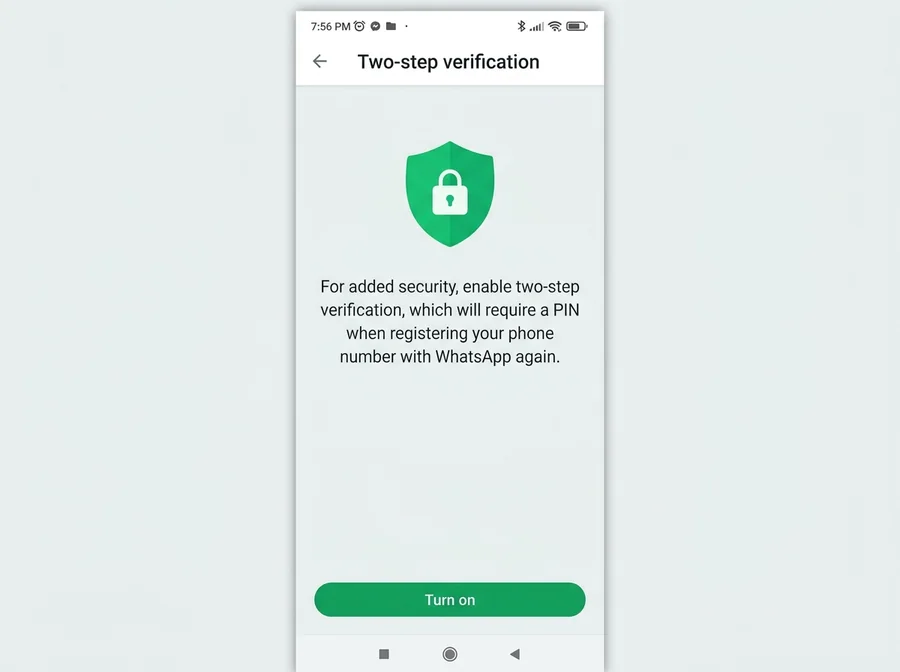 WhatsApp Two-Step Verification Setup
Security Comparison at a Glance
| Protection Level | Security Type | Takeover Risk | Setup Time |
|---|---|---|---|
| SMS OTP Only | Single-layer | Moderate to High | 1 minute |
| Two-Step Verification (PIN) | Dual-layer | Very Low | 2 minutes |
| PIN + Recovery Email | Maximum protection | Minimal | 3 minutes |
Step-by-Step Guide to Enable Two-Step Verification
You can activate this feature on both Android and iPhone in under two minutes with no technical expertise required:
- Open WhatsApp and navigate to Settings (tap the three-dot menu at the top right on Android, or the Settings tab at the bottom right on iPhone).
- Select Account from the menu, then tap Two-step verification.
- Tap the Turn on button at the bottom of the screen to begin setup.
- Enter a memorable yet hard-to-guess 6-digit PIN and re-enter it on the next screen to confirm.
- Add an active, secure Email Address and confirm it so you can reset your PIN anytime if you forget it.
- Tap Save or Done to lock in your new security layer immediately. You can return to this same menu anytime to change your PIN or update your email.
Common Mistakes and Best Practices
- Using Predictable PINs: Never use obvious sequences like 123456, 000000, or your birth year. Pick a unique combination only you know.
- Skipping the Recovery Email: Skipping email setup saves ten seconds now, but it can leave you locked out for up to 7 days if you ever forget your PIN.
- Sharing Codes with Friends: Scammers frequently hijack a friend's account and message you claiming a verification code was sent to your number by mistake. Never share any code or PIN with anyone.
- Ignoring Linked Devices: Check Linked Devices inside Settings regularly and log out of any unfamiliar browsers or desktop sessions immediately.
- Forgetting App Lock: Pair Two-Step Verification with WhatsApp's biometric App Lock so no one holding your unlocked phone can open your chats.
Frequently Asked Questions (FAQ)
1. Will I have to enter my PIN every time I open WhatsApp?
No. You only need the PIN when re-registering your phone number on a device, though WhatsApp occasionally prompts you for it as a friendly reminder so you do not forget it.
2. What happens if I forget my Two-Step Verification PIN?
If you linked a recovery email during setup, simply tap "Forgot PIN?" and WhatsApp will send a reset link directly to your inbox so you can regain access right away.
3. Can I recover my account if I forgot my PIN and skipped the email?
Yes, but for security reasons you must wait 7 full days before WhatsApp allows you to reset the PIN and verify your number without the old code.

Discussion & Comments (0)
No comments on this post yet. Be the first to comment!