
Before flying to Saudi Arabia on a work, Umrah, or family visit visa, you should always verify that your visa is officially stamped and authentic. Through the Saudi Ministry of Foreign Affairs (MOFA) official Visa Services Portal, you can check your Saudi visa status online in minutes without needing any account login.
What You Need for a Saudi Visa Check
- Visa / Application Number: The application or visa number printed on your MOFA slip or visa document.
- Passport Number: Your valid passport number entered without spaces (e.g., EG5849302).
- Nationality: Select Bangladeshi from the country dropdown list.
- Captcha Code: The numeric security verification code shown on the screen.
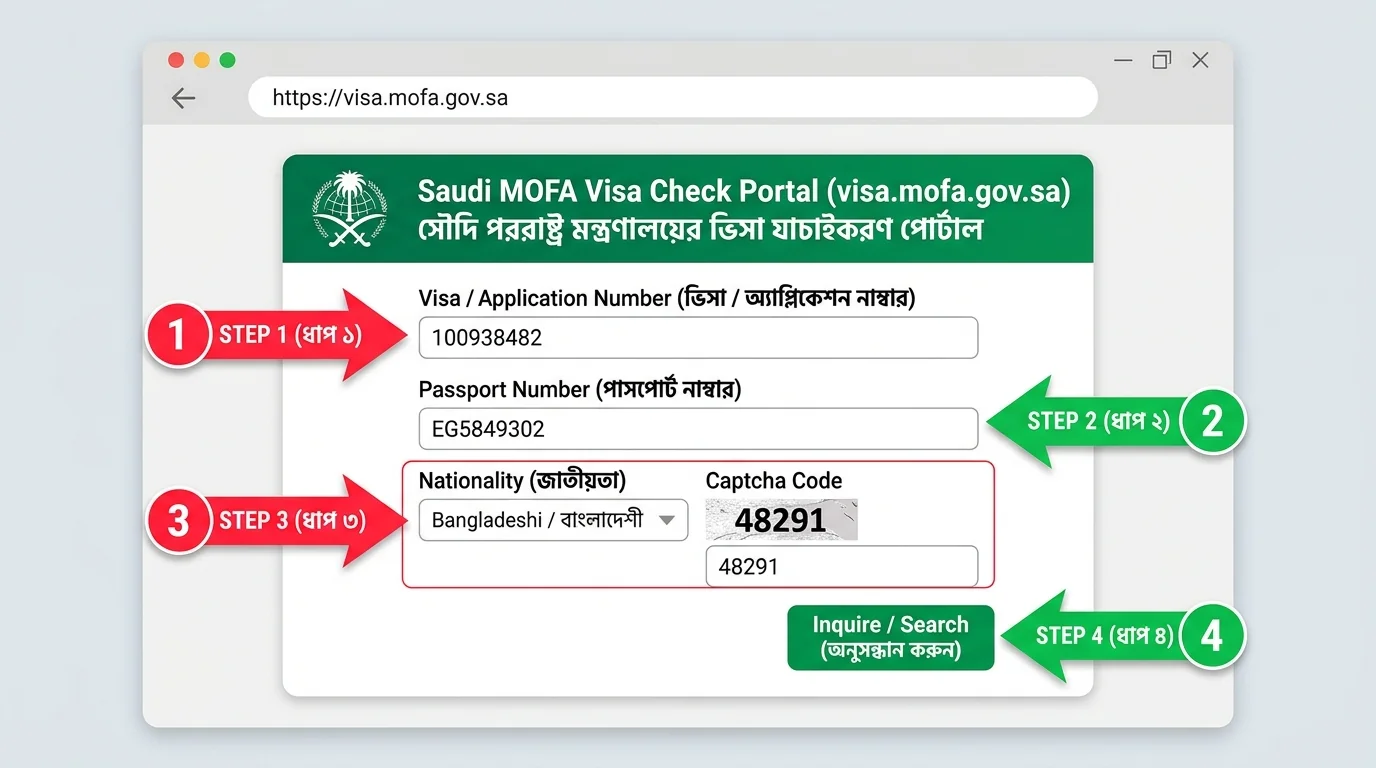 Figure: Where to enter Visa/Application Number, Passport Number, Nationality, and Captcha on visa.mofa.gov.sa
Step-by-Step Saudi Visa Status Check
Step 1: Visit the Official MOFA Portal
Open visa.mofa.gov.sa or go directly to visa.mofa.gov.sa/visaservices/searchvisa. If the page loads in Arabic, switch the language to English from the top navigation bar.
Step 2: Enter Your Visa/Application and Passport Number
In the first input box, enter your Visa Number or Application Number. In the second box labeled Passport Number, enter your passport number accurately.
Step 3: Select Nationality, Enter Captcha, and Click Search
Choose Bangladeshi under Nationality, type the Captcha Code (e.g., 48291) into the verification box, and click the green Inquire / Search button.
How to Read Your Result
- Issued / Approved: Your full visa details—including name, photo, sponsor/employer name, profession, and validity—will appear immediately, and you can print the visa copy directly.
- Under Process: If stamping is still pending, the portal will display an in-progress status.
- Safety Tip: Always verify directly on the official
.gov.sadomain rather than trusting unverified PDF screenshots.
Discussion & Comments (0)
No comments on this post yet. Be the first to comment!