
For Robi SIM users, keeping track of daily balance, remaining minutes, and internet data is essential. Especially when you don't have mobile data or are using a feature phone, you can quickly find all details by dialing USSD codes. Meanwhile, for smartphone users, the official My Robi app makes managing a SIM much more modern and convenient. This guide highlights all the essential checking codes for Robi SIMs and the main benefits of the app.
Essential Robi SIM USSD Code List
Dial the following codes to check your SIM information anytime without an internet connection:
- Main Balance Check: Dialing *222# displays your account's current balance and validity on the screen.
- Internet MB Check: Dial *3# or *8444*88# to check your remaining internet data and its validity period.
- Minute Balance Check: Dialing *222*2# shows how many minutes remain from your purchased bundle.
- SMS Balance Check: Dial *222*12# to see the number of free or purchased SMS in your account.
- Check Your Own Robi Number: If you forget your SIM number, dial *2# and your Robi number will immediately appear on the screen.
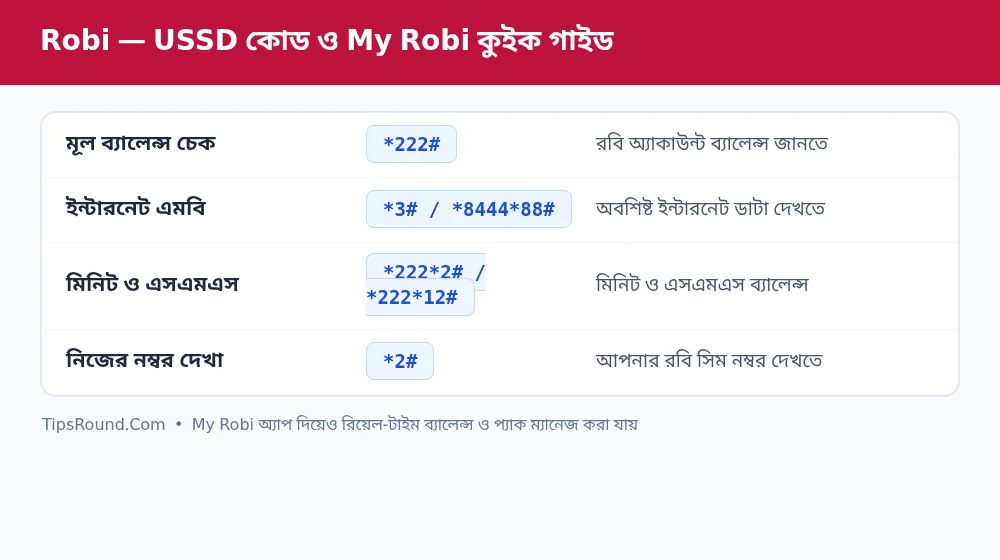 Codes to check Robi balance, minutes, and MB, plus My Robi app guide
Key Features of the My Robi App
Installing the official My Robi app from the Play Store or App Store gives you these extra benefits:
- Unified Dashboard: Opening the app shows an accurate breakdown of your main balance, internet data, minutes, and SMS on a single screen.
- Custom Pack (My Plan): You can build your own custom pack by choosing the exact amount of data, minutes, and validity days you need.
- Recharge and Usage History: Clearly verify when and how much you recharged over the past few days and where your balance was spent.
- Value-Added Service (VAS) Control: If any unknowingly activated tune or alert service is deducting money, you can turn it off directly from the app's management section.
- Roaming and Emergency Support: Quickly take an emergency balance (*8# or via the app) when needed and access live chat with 121 customer care.
Warning to Prevent Unwanted Balance Deductions
Once an internet pack expires, background apps on your phone often start deducting money from your main balance. To prevent this, turn off mobile data before your pack expires or use the data-lock/settings option in the My Robi app.
Simple Tips to Maintain Network and Internet Speed
Sometimes your SIM's internet may feel slow. Before calling the call center, check the following yourself:
- Network Mode (4G/Auto): Go to your phone's Settings > Mobile Network and check whether Preferred Network Type is set to '4G/3G/2G (Auto)'.
- Airplane Mode Refresh: If the network signal gets stuck, turning Airplane Mode on for 10 seconds and then off again establishes a fresh connection with the nearest tower.
- Correct APN Settings: Verify that the APN in your Robi SIM's internet settings is set to 'internet'.
Frequently Asked Questions (FAQ)
What is the code to get an emergency balance on a Robi SIM?
You can dial *8# or *123*007# to get an emergency balance, subject to eligibility.
Can family members' numbers be added to the My Robi app?
Yes, you can add multiple Robi numbers from the app's account section to manage and recharge them.
What is the Robi customer care number?
You can get direct support by calling 121 from a Robi SIM or through the help section of the My Robi app.
Conclusion: Remembering the essential USSD codes and using the My Robi app will make tracking and managing your SIM completely hassle-free.

Discussion & Comments (0)
No comments on this post yet. Be the first to comment!