
When building websites or custom forums with PHP and MySQL, new developers often make a critical mistake—inserting user input directly inside an SQL query. Exploiting this vulnerability, attackers can enter special SQL code into a login form or search box to delete or steal the entire database, a technique known as SQL Injection. In modern web development today, the most reliable and standard method to prevent this attack 100% is using PDO (PHP Data Objects) Prepared Statements.
Why Are PDO Prepared Statements So Secure?
There is a fundamental difference in how regular queries and Prepared Statements work:
- Separating Query and Data: A Prepared Statement first sends the SQL structure to the database server to be compiled, and then passes the user's input strictly as plain data (parameters).
- Automatic Escaping: Even if user input contains a single quote (') or semicolon (;), the database treats it as harmless text rather than an SQL command.
- Multi-Database Support: Using PDO makes it much easier to migrate from MySQL to PostgreSQL or SQLite in the future.
- Speed and Reusability: When running the same query repeatedly inside a loop, the server compiles it only once, resulting in better performance.
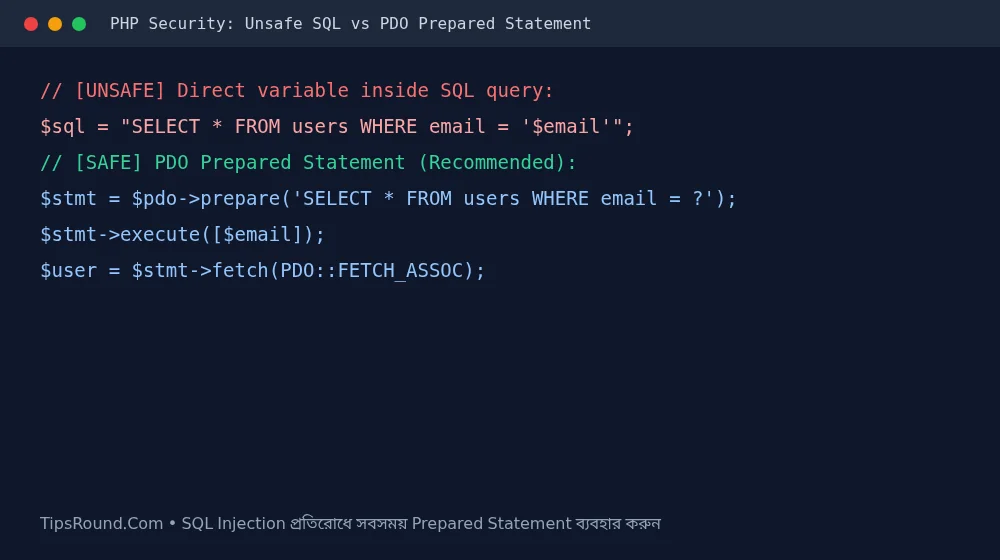 Proper code for using PDO Prepared Statements to prevent SQL Injection in PHP
Proper Examples and Rules for Writing Secure Code
Follow these rules in every database operation for login, registration, or post creation:
- Always Use Placeholders: Instead of writing $email or $_POST['id'] inside the query, use question marks (?) or named placeholders (:email) and pass the values as an array to the execute() function.
- PDO Exceptions and Emulate Prepares: When connecting, set ATTR_EMULATE_PREPARES => false and ERRMODE_EXCEPTION so that true native Prepared Statements are used.
- Hide Error Messages: On a live server (Production), never print raw PDO error messages directly to the browser; save them to server logs instead.
Not Just SQL Injection—Preventing XSS and CSRF Is Also Essential
Alongside securing the database, protect your site from XSS (Cross-Site Scripting) attacks by using htmlspecialchars($text, ENT_QUOTES, 'UTF-8') whenever displaying any user-generated content (such as comments or profile names) in the browser. And use CSRF tokens for form submissions.
Database Design and Password Hashing Rules
Beyond stopping SQL Injection, as a responsible PHP developer, extreme care is also needed when storing user passwords and data:
- Use password_hash(): Never store passwords in plain text or MD5 format in the database; always use PHP's built-in password_hash($pass, PASSWORD_DEFAULT).
- Verify Logins with password_verify(): When checking logins, use the password_verify() function rather than comparing strings directly.
- Input Validation: Validate incoming form emails with filter_var($email, FILTER_VALIDATE_EMAIL) and numeric IDs using (int) or ctype_digit.
Frequently Asked Questions (FAQ)
Can I stay safe using MySQLi as well?
Yes, using prepare() and bind_param() in MySQLi also prevents SQL Injection, though PDO is more popular for its simplicity and cleanliness of code.
Are addslashes() or mysql_real_escape_string() enough?
No, in modern PHP these are considered outdated and unsafe methods; using Prepared Statements is always mandatory.
Do placeholders work for ORDER BY or table names?
No, placeholders do not work for table or column names; in those cases, you must validate against a predefined list of allowed names (Whitelist).
Conclusion: Building the habit of using PDO Prepared Statements from day one will keep your PHP web projects hacker-free and professional.



Discussion & Comments (0)
No comments on this post yet. Be the first to comment!