
Before traveling from Bangladesh to Malaysia for tourism, study, or work, verifying whether your Malaysia e-Visa (eVISA) is genuine is essential. Instead of relying solely on a PDF sent by an agent, you can verify your visa authenticity for free in under a minute directly on the official Immigration Department of Malaysia MYVISA Portal.
Required Information to Check Malaysia e-Visa
- Passport / Document Number: Your exact passport number including letters and digits without spaces (e.g., A12345678).
- Sticker / Reference Number: The Sticker Number printed on your e-Visa document or the Application Reference Number from your confirmation email.
- Date of Birth / Nationality (where applicable): Tracking portals such as VFS or status inquiry pages may also ask for your Date of Birth and Nationality (Bangladesh).
- Captcha Code: The security characters displayed on the verification screen.
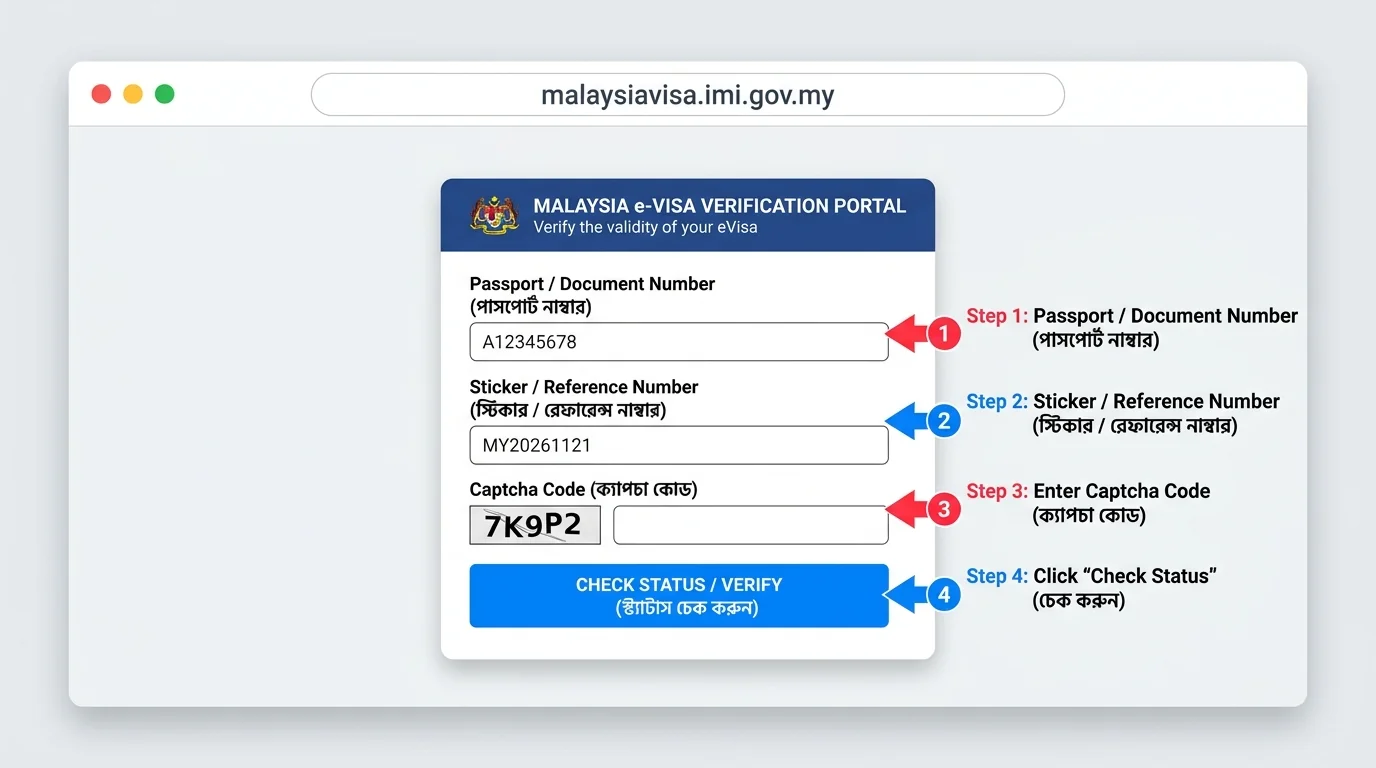 Figure: Where to enter Passport Number, Sticker Number, and Captcha on the Malaysia e-Visa Portal
Step-by-Step Guide to Verify Malaysia e-Visa
Step 1: Open the Official Government Portal
Visit the official Malaysia Immigration verification page at malaysiavisa.imi.gov.my/evisa/check-evisa (or malaysiavisa.imi.gov.my/evisa/evchk for application tracking). Always confirm the URL ends in .gov.my before entering your passport details.
Step 2: Enter Passport and Sticker/Reference Number
In the first field labeled Passport / Document Number, type your passport number carefully. In the second field labeled Sticker / Reference Number, enter the sticker or reference code from your e-Visa PDF.
Step 3: Solve the Captcha and Click Check Status
Type the displayed Captcha Code (e.g., 7K9P2) accurately into the input box and click the blue Check Status / Verify button.
Understanding Your Result & Next Steps
- Approved / Verified: If your name, passport number, validity dates, and photo appear, your e-Visa is genuine. Print two color copies on A4 paper for travel.
- Not Found: Double-check your passport and sticker number for typos. If it still fails, contact your agency immediately.
- Mandatory MDAC: Remember to complete the free Malaysia Digital Arrival Card on imigresen-online.imi.gov.my/mdac/main within 3 days prior to arrival.
Discussion & Comments (0)
No comments on this post yet. Be the first to comment!