
Scrolling through Facebook, WhatsApp, or YouTube often brings dramatic photos, emotional videos, and shocking headlines into your feed. Unfortunately, many viral posts recycle years-old images out of context or spread manipulated and AI-generated misinformation. Sharing unverified claims causes unnecessary panic and confusion. Learning four simple fact-checking habits helps you verify what is real before hitting share.
4 Easy Ways to Spot Fake Photos and Viral Rumors
You do not need advanced technical skills or paid tools to verify online claims—just your smartphone and a minute of careful checking:
- Run a Reverse Image Search with Google Lens: Save or screenshot any suspicious photo, then search it using the camera icon in Google Chrome or the Google app (Google Lens). You will immediately see where, when, and in what original context that image first appeared online.
- Cross-Check with Trusted News Outlets: If a major disaster, policy change, or shocking event appears only on an unfamiliar social media page, treat it skeptically. Genuine major news is always reported by established, credible media or official government portals.
- Inspect Visual Details for AI or Editing Flaws: Zoom in closely on hands, fingers, eyes, teeth, background text, and lighting shadows. AI-generated visuals frequently show distorted fingers, garbled background signs, mismatched shadows, or unnaturally smooth skin.
- Check Dates, Sources, and Emotional Framing: Old clips from different countries are often reposted as local breaking news. Watch out for urgent phrases like "Share before this gets deleted," which are classic red flags of misinformation.
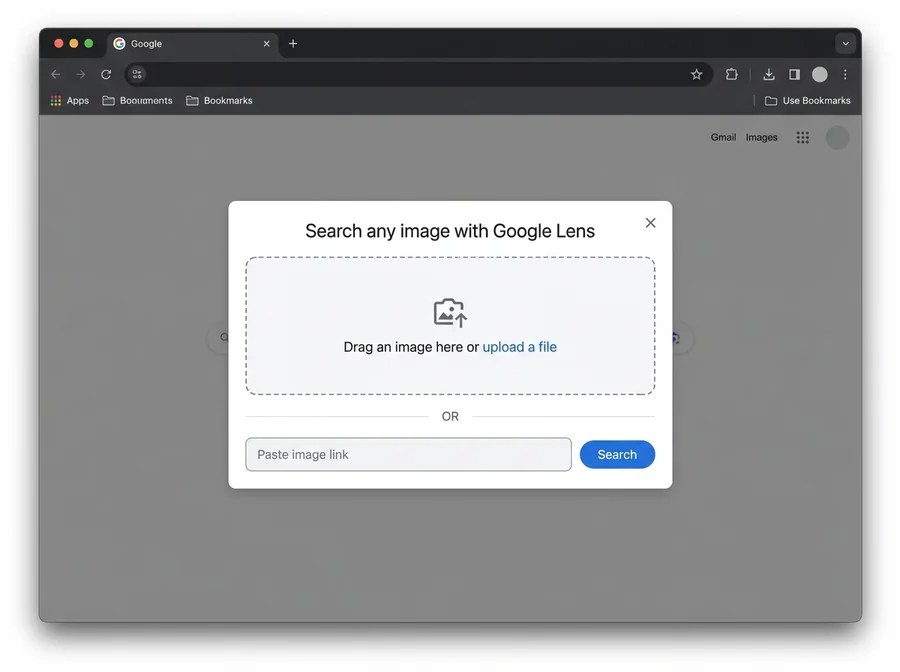 Google Lens Reverse Image Search
Quick Comparison of Fact-Checking Methods
| Method | Tool Needed | What It Catches | Time Required |
|---|---|---|---|
| Reverse Image Search | Google Lens / TinEye | Recycled old photos or wrong locations | 30 seconds |
| Media Cross-Check | Google News / Official sites | Fabricated events or fake announcements | 1–2 minutes |
| Visual Inspection | Manual zoom-in check | Photoshop edits and AI-generated errors | 1 minute |
| Fact-Check Portals | Verified fact-checkers | Debunked viral claims and hoaxes | 1 minute |
Why Misinformation Spreads So Fast
Viral hoaxes are intentionally designed to trigger anger, fear, or urgency so readers react before thinking. Taking just thirty seconds to pause and verify the original source protects both your reputation and your community from unnecessary confusion.
Common Mistakes and Smart Verification Tips
- Sharing After Reading Only the Headline: Clickbait headlines often distort the actual story. Always read the full article and check its primary source before reposting.
- Trusting Screenshots and Photo Cards Blindly: Fake news cards and altered social media screenshots take seconds to fabricate. Verify directly on the official website or verified page.
- Judging Truth by Comment Volume: Coordinated bot comments can make false posts look credible; rely on independent evidence instead of crowd reactions.
- Ignoring Lookalike Domains: Scammers often copy reputable news logos onto misspelled domain names, so always inspect the URL carefully.
Frequently Asked Questions (FAQ)
1. Are there alternatives to Google Lens for reverse image search?
Yes, TinEye and Yandex Images are free, reliable alternatives that work well for tracing the original source and upload date of a photo.
2. How can I fact-check a suspicious viral video?
Take a screenshot of a clear, recognizable frame from the video and run it through Google Lens to locate the original upload date and context.
3. What should I do if I accidentally shared fake news?
Delete the post as soon as you realize it is inaccurate, and if many people saw it, post a brief correction so the misinformation stops spreading.
Discussion & Comments (16)