
Having essential USSD codes handy is very useful for Grameenphone (GP) users, one of the largest mobile networks in the country. If you use a feature phone or do not have a data connection on your smartphone, you can instantly check your balance, minutes, and internet MB using these codes. Additionally, smartphone users can manage their SIM completely digitally through the MyGP app. Let's explore all the important Grameenphone codes and app features.
Essential Grameenphone USSD Codes
Dial the following codes to check your SIM information anytime without any internet charges:
- Main Balance Check: Dial *566# to see your account's main balance and validity on the screen.
- Internet MB Check: Dial *121*1*4# to view your remaining internet data, bonus data, and expiration date.
- Minute Balance Check: Dial *121*1*2# to find out how many minutes are left from your purchased packs.
- Check Your Own GP Number: If you forget your SIM number, dial *2# and your 11-digit GP number will immediately appear on the screen.
- SMS Balance & Emergency: Use *121*1*5# to check your SMS balance, and *121*1*3# or *1010*1# to view emergency balance details.
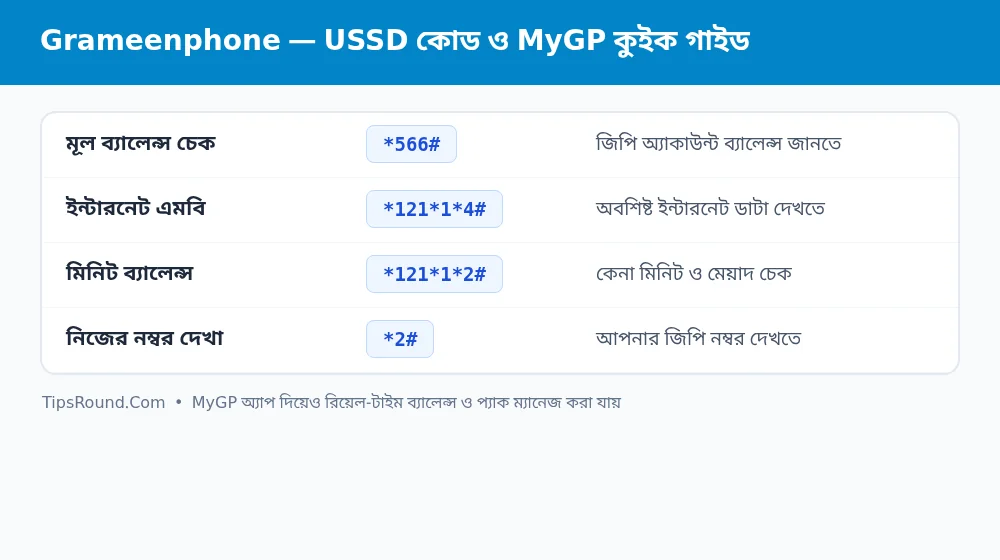 Grameenphone balance, minute, and MB check codes and MyGP app guide
Key and Modern Features of the MyGP App
The MyGP app is an all-in-one solution for Grameenphone users. The main benefits of the app include:
- Flexiplan: This is one of MyGP's most popular features. Through it, you can customize exactly how many GB of data, minutes, SMS, and days of validity you need.
- At-a-Glance Dashboard: As soon as you open the app, your main balance, data, minutes, and GP Points are clearly displayed.
- Value-Added Service (VAS) Control: If any unwanted welcome tune or alert service is active, you can easily turn it off from MyGP's management option.
- Recharge and Usage History: You can view graphs and lists in the app showing how much MB or money was spent over the last 30 days.
- Data Saving & Pay-As-You-Go Protection: To prevent your main balance from being deducted when MB runs out, you can use data alerts and internet controls right from the app.
Important Tips for SIM Security
Keep your profile and email linked in the MyGP app so your GP number does not fall into unauthorized hands. Also, staying alert before your pack expires helps protect your remaining data from going to waste.
Effective Tips to Save Mobile Data and Call Costs
Alongside knowing the right codes and app features, building a few smart daily habits can significantly lower your monthly expenses:
- Download over Wi-Fi: Always complete large app updates, movie downloads, or system updates on your home or office Wi-Fi network.
- App Data Restriction: Regularly check the Data Usage section in the MyGP app to see which apps consume the most MB and restrict background data for unnecessary apps.
- Check Validity and Auto-Renewal: When purchasing any pack, check whether auto-renewal is enabled so that your balance is not deducted unexpectedly later.
Frequently Asked Questions (FAQ)
Can the validity of GP SIM MB and minutes be extended together?
Before the respective pack expires, it is best to check whether the extension rules apply to a similar specific pack or via MyGP.
Does the MyGP app work without internet?
If your GP SIM's mobile data is turned on, you can view basic balances and information through the zero-rated facility.
What is the GP customer care number?
For any assistance, you can call 121 from your GP SIM.
Conclusion: Using the essential USSD codes and smart features of the MyGP app will make managing your Grameenphone SIM much easier and more cost-effective.

Discussion & Comments (0)
No comments on this post yet. Be the first to comment!