
For users of Banglalink, one of Bangladesh's most popular mobile operators, knowing how to quickly check balance, internet data, and minutes is very useful. In urgent moments when you have no data on your phone—or if you use a feature phone—offline USSD codes are essential. Meanwhile, smartphone users can manage their entire SIM account in one tap using the MyBL app. This post brings together all essential Banglalink checking codes and the main features of the MyBL app.
Essential USSD Code List for Banglalink SIM
Dial the codes below anytime without internet to check your SIM details:
- Main Balance Check: Dial *124# to see your remaining account balance and SIM validity on screen.
- Internet MB Check: Dial *5000*500# to check your remaining internet data and expiration date.
- Minute & SMS Check: Dial *124*7# or *124*2# to verify your purchased minute and SMS balances.
- Check Your Own Banglalink Number: If you forgot your SIM number, dial *511# and your number will appear on screen.
- Emergency Balance: When your balance runs out, dial *874# to take Emergency Balance and check your due amount.
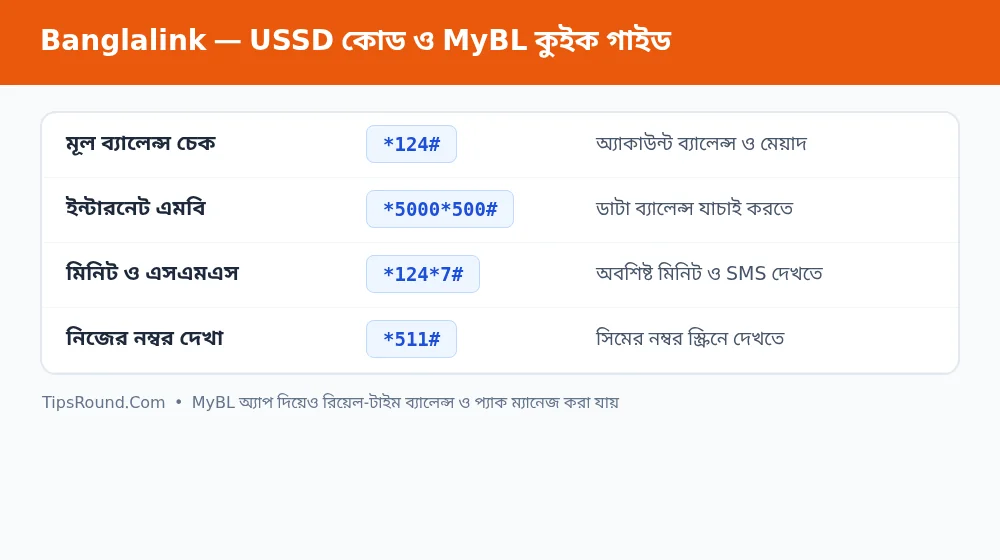 Codes for checking Banglalink balance, minutes, and MB, plus a MyBL app guide
Important Features of the MyBL App
MyBL is no longer just a telecom app—it is a complete digital management platform. Useful features available in the app include:
- Real-Time Balance & Data Meter: View exact figures for your main balance, minutes, MB, and SMS right on the home screen.
- Custom Bundles (Amar Pack): Create a custom pack by selecting minutes, data, and validity according to your budget and usage.
- Stop Value-Added Services (VAS): If any ringtone or alert service is accidentally active, you can turn it off directly from the Manage section.
- Call & Recharge History: Check detailed records of your recent calls, SMS, and recharges inside the app.
- SIM & Profile Support: File complaints or get direct assistance from Customer Care via live chat or in-app support.
Precautions to Protect Your Balance
Many users complain that money gets deducted unexpectedly from their main balance after an internet pack expires. To avoid this issue, turn off mobile data at least 10 minutes before your pack expires, or use the Pay-As-You-Go data charge protection option in the MyBL app.
Tips to Track and Reduce SIM Balance and Data Usage
Sometimes it feels like MB or balance runs out too quickly. A few small adjustments in phone settings can reduce unnecessary spending:
- Restrict Background Data: Go to Settings > Mobile Network > Data Usage on your phone and turn off background data for apps you do not need running constantly.
- Keep Auto-Updates on Wi-Fi Only: Setting 'Auto-update apps' to 'Over Wi-Fi only' in Google Play Store settings prevents wasted mobile data.
- Control Video Quality: Keep video resolution at 480p or enable Data Saver mode on YouTube and social media apps when using mobile data.
Frequently Asked Questions (FAQ)
How do I find my Banglalink number if I forgot it?
Simply dial *511# from your phone to display your number on screen at no charge.
Can I check remaining MB and minute validity together?
Yes, opening the MyBL app dashboard shows the remaining amounts and expiration dates for all packs together.
What is the code to stop accidentally activated services?
You can dial *121*5*1*2*1# or use Service Management in the MyBL app to turn off unnecessary Value-Added Services.
Conclusion: Knowing the right codes and MyBL app features makes tracking and managing your Banglalink SIM much easier.

Discussion & Comments (0)
No comments on this post yet. Be the first to comment!