
In Bangladesh today, almost every essential digital service—from mobile banking to online account verification—is tied to our mobile number. According to BTRC rules, a citizen can register a specific number of SIM cards using their National Identity Card (NID). However, sometimes due to carelessness or during biometric verification at an old shop, extra SIMs may unknowingly be registered against your NID. It is crucial to verify whether anyone else is using a number registered under your NID.
3 Steps to Check the Number of SIMs Registered to Your NID
You can find this information in just 30 seconds from any mobile operator in Bangladesh (Grameenphone, Robi, Airtel, Banglalink, or Teletalk):
- Step 1: Dial the USSD Code: Open the dial pad on your active SIM, enter *16001#, and press the call button.
- Step 2: Last 4 Digits of Your NID: A prompt will appear on the screen where you need to enter the last 4 digits of your National Identity Card (NID / Smart Card) number and tap Send.
- Step 3: Check the Return SMS: Within a few seconds, a return SMS will arrive showing the total number of SIMs registered under your NID across all operators, along with the first and last few digits of those numbers.
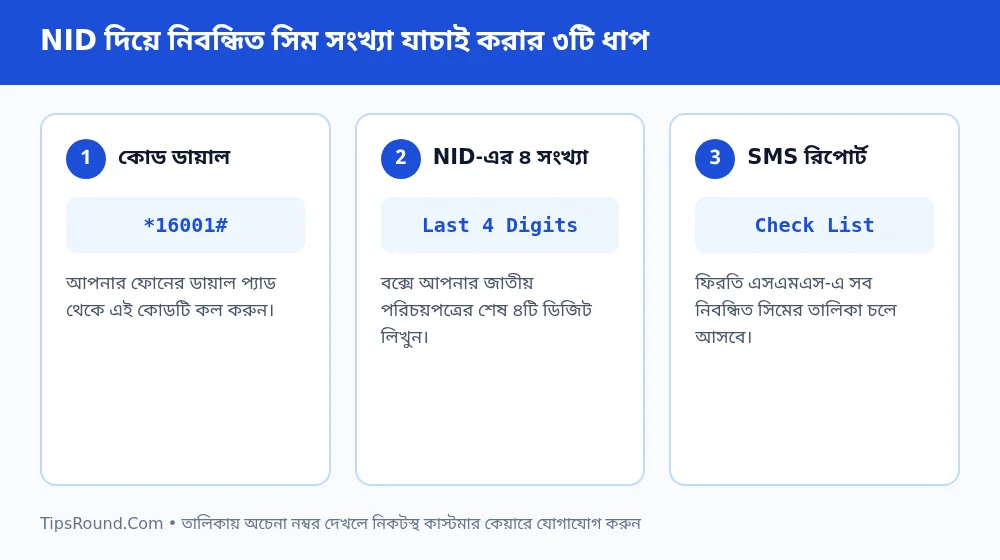 Steps to check SIMs registered under your NID by dialing *16001#
What to Do If There Are Unknown or Unwanted SIMs?
Carefully review the list received in the return SMS. If you see any number that neither you nor anyone in your family uses, take the following steps immediately:
- Visit the Nearest Customer Care: Go to the official customer care center of the respective mobile operator with your original National Identity Card (NID).
- De-registration or Ownership Cancellation: Show the list to the customer care representative and deactivate or de-register the unknown SIM from your NID through biometric verification.
- Transfer Old SIMs: If another member of your family uses one of your SIMs, it is safer to complete an Ownership Transfer to their own NID.
Why Is This Verification So Important?
If someone else uses a SIM registered under your NID for illegal activities or cyber fraud, legally the registered owner of the SIM is held accountable first. Therefore, completing this check at least once a year is a safe habit for every citizen.
Immediate Steps If Your SIM Is Lost or Stolen
If a phone containing a SIM registered under your NID is ever lost or stolen, take these steps without delay:
- Temporary SIM Block: Immediately call the respective mobile operator's customer care or contact them from another number to block the SIM.
- Protect Mobile Banking and Email: Notify the bKash, Nagad, or Rocket helpline for temporary protection, and lock the phone from another device using your Google account's 'Find My Device'.
- Get a Replacement SIM: Visit the nearest customer care center with your original NID and biometric verification to replace your old number onto a new SIM.
Frequently Asked Questions (FAQ)
Does dialing *16001# cost any money or charge?
No, this service is completely free; however, for the code to work, the SIM you are dialing from must be registered under that same NID.
What is the maximum number of SIMs allowed per NID?
Under government and BTRC policies, there is a specific maximum limit on SIM registrations per user's NID; you can hold SIMs across all operators within that limit.
Why doesn't the SMS show the full numbers?
For security reasons, a few middle digits are masked with asterisks (*), allowing you to easily identify the numbers you recognize.
Conclusion: Dial *16001# today to check the list of SIMs registered under your NID and stay worry-free by deactivating any unnecessary SIMs.

Discussion & Comments (0)
No comments on this post yet. Be the first to comment!