
Bangladesh's biometric e-Passport system allows citizens to complete registration, pay government fees, and track application progress online without relying on middlemen. Whether you are applying for a brand-new passport or renewing an older booklet, following the official steps carefully prevents unnecessary delays during biometric enrollment and police verification.
Step-by-Step Bangladesh e-Passport Application Process
Start your application directly on the official portal epassport.gov.bd by completing these five stages:
- Register and Fill Out the Online Form: Create an account using your regional passport office location, then enter your personal details matching your National ID (NID) or Birth Registration Certificate word for word.
- Choose Validity and Pay Fees: Select either a 48-page or 64-page booklet with 5-year or 10-year validity under Regular, Express, or Super Express delivery, and pay online via A-Challan, bKash, Nagad, debit/credit card, or partner banks.
- Attend Biometric Enrollment: Visit your assigned passport office on your appointment date with your printed application summary, payment receipt, and original NID or birth certificate for photo, iris scan, and fingerprint capture.
- Complete Police Verification: No need for new passport.
- Collect Your e-Passport: Once your status reads ready for issuance and you receive an SMS alert, visit the passport office with your delivery slip and original NID to collect your passport.
How to Check e-Passport Status Online
After biometric enrollment, visit epassport.gov.bd/authorization/application-status. Enter your Online Registration ID (OID) or Application ID from your delivery slip along with your Date of Birth and complete the captcha verification to view live application progress.
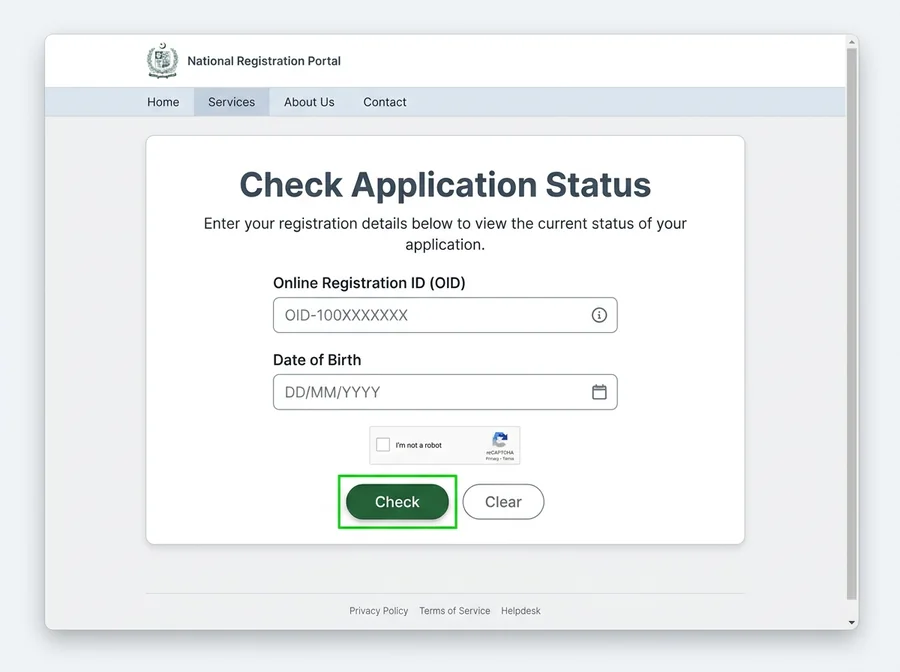 e-Passport Status Check (OID & Date of Birth)
Understanding e-Passport Status Messages
| Status Message | What It Means | Next Step |
|---|---|---|
| Enrolment Pending / Submitted | Form submitted; awaiting or processing biometrics | Attend your scheduled passport office appointment |
| Pending for Police Clearance | Under address verification by Special Branch | Not for new passport |
| Approved / In Printing Queue | Verification cleared and queued for printing | Wait a few days and re-check the portal |
| Passport Shipped / Ready | Printed and delivered to your passport office | Collect in person with delivery slip and NID |
Essential Documents for Biometric Enrollment
Before visiting the passport office, organize your original NID or online birth certificate, printed application summary, payment receipt, previous passport (for renewals), and any required No Objection Certificate (NOC) or professional proof.
Common Mistakes and Helpful Tips
- Mismatched NID Spelling: Even a minor spelling or date-of-birth discrepancy between your form and NID can pause processing until corrected.
- Wrong Police Station Selection: Choosing an incorrect thana under present or permanent address delays police clearance significantly.
- Paying Unofficial Agents: The online portal is transparent and straightforward—avoid middlemen who charge extra without speeding up official verification.
- Leaving Phone Off During Verification: Keep your registered mobile number active so Special Branch officers can contact you promptly.
Frequently Asked Questions (FAQ)
1. What if I lose my delivery slip and forget my OID?
Log back into your e-Passport portal account and re-download the Application Summary PDF, which clearly displays your Online Registration ID (OID).
2. Is police verification required for e-Passport renewal?
If your personal details remain unchanged and match your NID, routine renewals typically do not require fresh police verification unless information is modified.
3. How long does e-Passport delivery usually take?
Regular applications generally take 15 to 21 working days after enrollment and clearance, while Express applications take about 7 to 10 working days.
Discussion & Comments (0)
No comments on this post yet. Be the first to comment!