
Many of us use an Airtel SIM for daily communication, online classes, or work. However, when you need to check your main balance, remaining internet MB, or minutes, not knowing the right code can be frustrating. Especially when there is no internet connection on your phone, USSD codes are your only reliable option. On the other hand, if you have data on your smartphone, the My Airtel app lets you access all information and customization options in one place. This guide covers all essential Airtel SIM checking codes and useful features of the official app in detail.
Essential USSD Codes for Airtel SIM
Without an internet connection, you can dial the codes below from any feature phone or smartphone to check your current account status:
- Main Balance Check: Dial *1# or *778# to view your current main account balance and validity on screen.
- Internet MB Check: Dial *3# or *8444*88# to see how many MB or GB of data remain on your SIM and when it expires.
- Minute Balance Check: Dial *778*0# to display the remaining minutes from your purchased bundle and their validity period.
- SMS Balance Check: Dial *778*6# to check the number of free or purchased SMS remaining in your account.
- Check Your Own Airtel Number: If you bought a new SIM or forgot your number, dial *121*7*3# to easily view your 11-digit number.
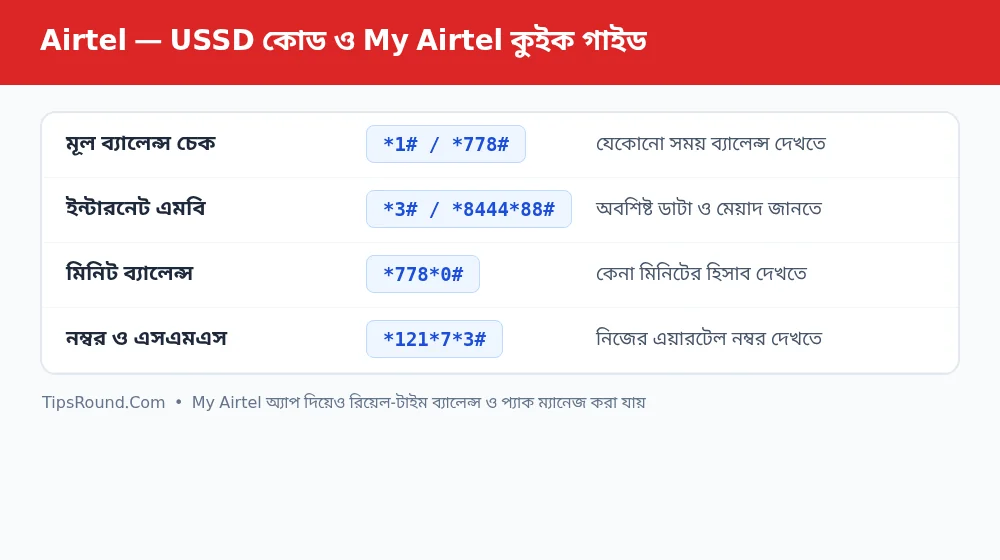 Essential codes for checking Airtel balance, minutes, and MB, plus a My Airtel app guide
Key Features and Benefits of the My Airtel App
Beyond dialing codes, installing the official My Airtel app from the Google Play Store or App Store makes managing your SIM much easier. Some notable features of the app include:
- Real-Time Dashboard: As soon as you open the app, the home screen displays separate progress bars for main balance, internet data, minutes, and SMS.
- My Pack or Custom Plans: You can build your own pack by choosing the exact amount of GB data, minutes, and validity days you need.
- Detailed Usage History: You can view complete details directly in the app about when and how much you recharged, or where your balance was spent.
- Value-Added Service (VAS) Control: If a caller tune, news alert, or game subscription is accidentally activated and deducting money, you can turn it off in one click from the app's management section.
- Multiple Number Management: You can add family members' Airtel numbers to the same app to check their balances and recharge for them.
Tips to Prevent Unexpected Balance Deductions
Often, if mobile data is left on when a data pack expires, money starts getting deducted from the main balance. To avoid this, it is wise to enable Data Saver or the Pay As You Go block service before your pack expires. Also, avoid tapping 'OK' or 'Accept' on unknown pop-up messages so unwanted services are not activated.
Frequently Asked Questions (FAQ)
Can the My Airtel app be used without internet?
Yes, when Airtel SIM data is turned on, basic app information can often be viewed via zero-rated access without main balance or MB, though full features require a small amount of data or Wi-Fi.
What is the code to take and check Emergency Balance?
Dial *141# to take Airtel's Emergency Balance (Jhotpot Balance) and check your due amount.
What is the easiest way to stop Value-Added Services?
You can turn off all unnecessary services from the Service Management option in the My Airtel app or by calling Customer Care (121).
Conclusion: Saving essential USSD codes on your phone and regularly using the My Airtel app will give you complete control over your SIM balance and data usage.

Discussion & Comments (0)
No comments on this post yet. Be the first to comment!